Changelog

Follow new updates and improvements to Smartlead.

August 11th, 2026

New

Now you know the moment something breaks, not when your replies do.

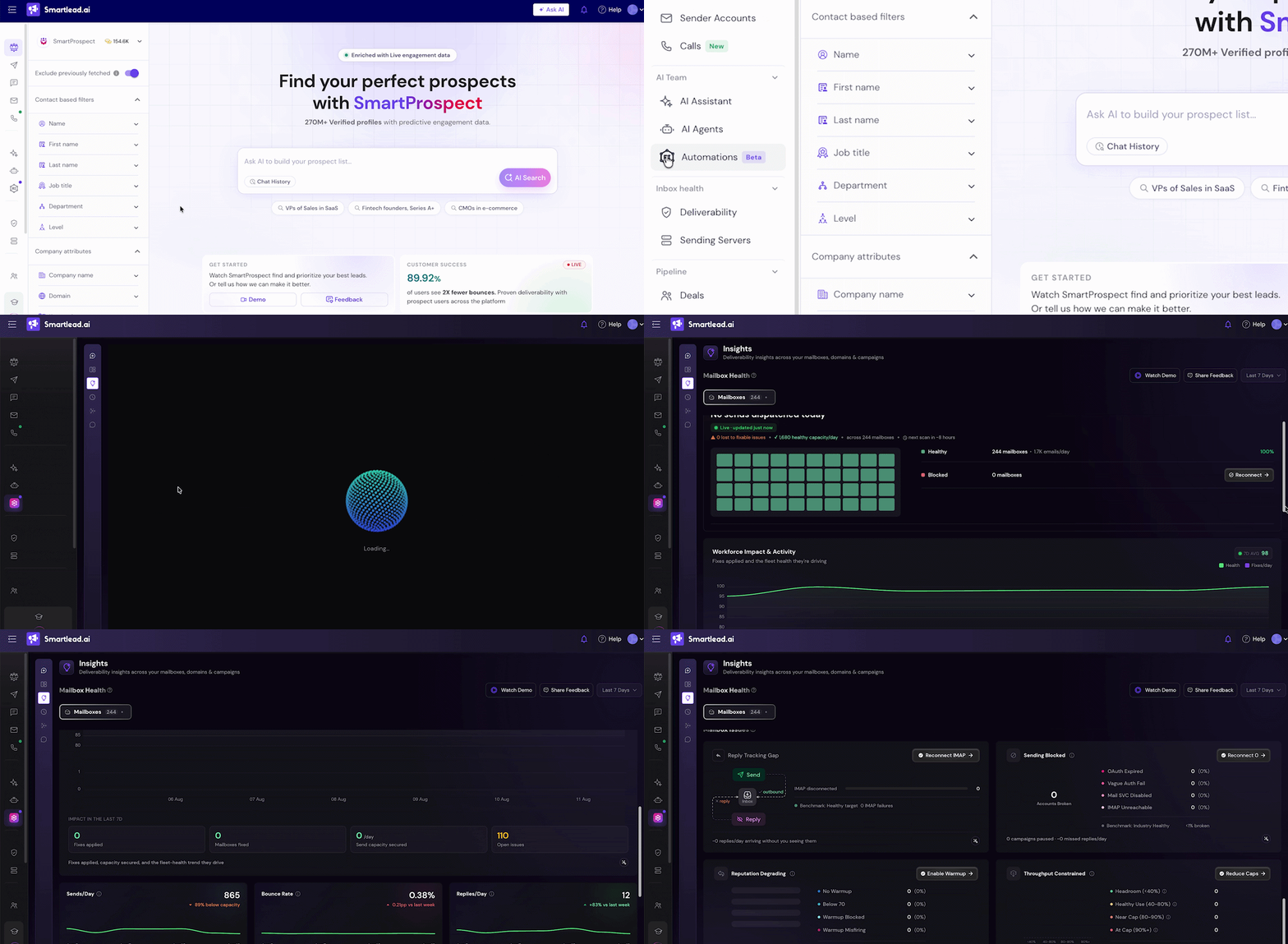
Meet Insights - a live deliverability view inside Smartlead that watches every mailbox in your account and fixes what it can, reconnects, enables warmup, capacity, before you ever have to ask.

To find it, go to Automations in your sidebar under the AI Team tab, click the Insights icon.

Open it and you land on a live view: sends dispatched, a Live badge updating in real time, and a countdown to the next scan.

Here's what's possible:

  • One-click Reconnect fixes every blocked mailbox immediately

  • Every degrading mailbox filterable by issue (No Warm-up, Below 70, Blocked, Misfiring) or provider

  • Tap Summarise on any mailbox card for what's wrong and what to do

  • Switch between Last 7 Days and Last 14 Days, every number on the page re-scopes with you

  • Workforce Impact & Activity: see fixes applied, mailboxes fixed, and send capacity secured, not just today's snapshot

  • Honest, redesigned views that show real zero-send days instead of smoothing them out

[Open Insights]

August 4th, 2026

New

We've reorganized the left navigation bar, so everything finally has a home.

Your tools are now grouped into five clear sections - Engage, AI Team, Pipeline, Inbox Health, and Performance.

Now you spend less time hunting and more time sending.

Same features. Just easier to find.

[Explore It Now]

July 13th, 2026

Improved

Calls are no longer a separate part of your workflow.

Add a call wherever it fits inside the sequence you're already running.

Every sequence call opens with the full thread already in view: emails sent, opens, replies - no tab switching, no digging through history.

What’s More:

βœ… Lead Upload & Direct Calling - Upload leads and start calling right away, without adding them as a sequence step

βœ… Direct Dial - Dial any number manually, no lead upload required

βœ… Number Enrichment from SmartProspect - Pull verified numbers straight from SmartProspect

Adding calls to your email sequence can drive up to 2.5Γ— more positive replies and 30% higher conversion.

Because the best calls are never cold.

Start Calling

May 14th, 2026

New

You now have a personal assistant inside Smartlead.

Meet SmartAssistant, your new support experience built right into the platform.

  • New to outbound? It walks you through setup.

  • Running campaigns? It handles the details.

  • Stuck on something? Skip the ticket. Just ask, and it answers using your account data, not generic advice.

Set up a campaign. Find leads. Fix an issue. Write a sequence. All through a single chat, on every page, inside your account.

This isn't a chatbot. It's a co-pilot that knows where you are and what you need.

Find it in the bottom-right corner of every page.

Talk to Your Assistant Now

April 23rd, 2026

New

Now you can create up to 25 admin API keys, each with its own name.

One key for every integration is finally a thing of the past.

Until today, your entire Smartlead account ran on a single admin API key. One key powering your Zapier workflows, your Clay enrichment, your custom scripts, and every teammate touching the API. Rotating it broke everything. Revoking it broke everything. Debugging which integration was eating your rate limit?

What you can do now:

  • Create a dedicated key per integration (e.g., "Zapier Integration", "Clay Sync", "Internal Dashboard")

  • Give each team member their own key instead of sharing one

  • Rename, reset, or revoke any non-primary key without touching the others

  • Recover context on revoked keys from the new Revoked Keys tab

What hasn't changed: Your account's rate limit stays the same. It's now shared across all your admin keys instead of tied to one, so no surprise throttling.

Where to find it: Settings β†’ API Key Management β†’ + Create API Key

Create Your Key Now

March 25th, 2026

The Smartlead CLI is now live. Install it in one line and manage campaigns, leads, mailboxes, analytics, and your inbox directly from the terminal.

InstallΒ npm install -g @smartlead/cli

What you can do

  • Export leads as CSV

  • Pull analytics across campaigns

  • Manage your unified inbox β€” reply, forward, categorize

  • Search prospects and find emails

  • Automate workflows with cron or shell scripts

β†’Β npm packageΒ Β·Β GitHub

CLI vs. MCP β€” what's the difference?Β Use theΒ CLIΒ when you need data fast (no AI reasoning required). Use theΒ MCP when you need Claude to reason over that data. They're built to complement each other.

Experience It Now

February 17th, 2026

Introducing SmartDialer - the conversation layer you have been waiting for.

Now call your leads at the right moment - with full context and zero manual work after.

SmartDialer activates the conversation when interest is highest.

What this means for you:

βœ… Call prospects exactly when intent spikes
βœ… View and download call transcripts, see email history
βœ… Auto-log notes and update CRM instantly
βœ… Eliminate post-call admin work
βœ… Keep momentum moving across channels

Every serious opportunity deserves a real conversation.

SmartDialer makes sure it happens.

To access, go to Master Inbox Β» open any lead conversation thread Β» click on Call Lead on top

Make Your First Call

February 9th, 2026

SmartAgents execute your outbound workflows inside Smartlead.

Deploy agents that can:

  • create and manage campaigns

  • send emails, follow up, and handle replies

  • sync actions across your CRM, LinkedIn, Sheets, and team tools

  • monitor mailbox health and campaign performance

  • take action automatically β€” and loop you in only when needed

No code. Just commands.

Build Your First SmartAgent

January 21st, 2026

Time to go MULTICHANNEL

You can now run:

  • Email

  • LinkedIn

…from one system, with shared data and automated workflows using SmartAgents.

What this means for you:

  • Automatically continue email follow-ups after LinkedIn steps

  • Keep both channels in sync without manual work

  • No switching tools or rebuilding workflows

Multichannel outreach just got simpler.

Try it Now

January 16th, 2026

Smartlead now shows theΒ real quality of your warmup, not just activity.

Warmup isn’t a checkbox.
It’s infrastructure β€” and it decides inbox placement.

So, now you can see:

  • YourΒ warmup pool tier

  • ItsΒ deliverability impact

  • Your path toΒ Premium and Ultra Premium pools

Top senders don’t just warm up.
They warm up onΒ better pools.

πŸ“Where to Find It

Email Accounts β†’ Warmup Pool ribbon at the top β†’ See How To Upgrade.

View My Warmup Pool